Restaurant POS software judged at the counter, not in a demo
Restaurant POS software is the system that takes an order, bills it, tells the kitchen and records what it cost you. Ours books an order in under ten seconds, holds it out of the kitchen queue until payment confirms, and notifies the customer at each stage — built end to end for a working pizzeria rather than assembled from a feature specification.
Free 30 minutes · no obligation
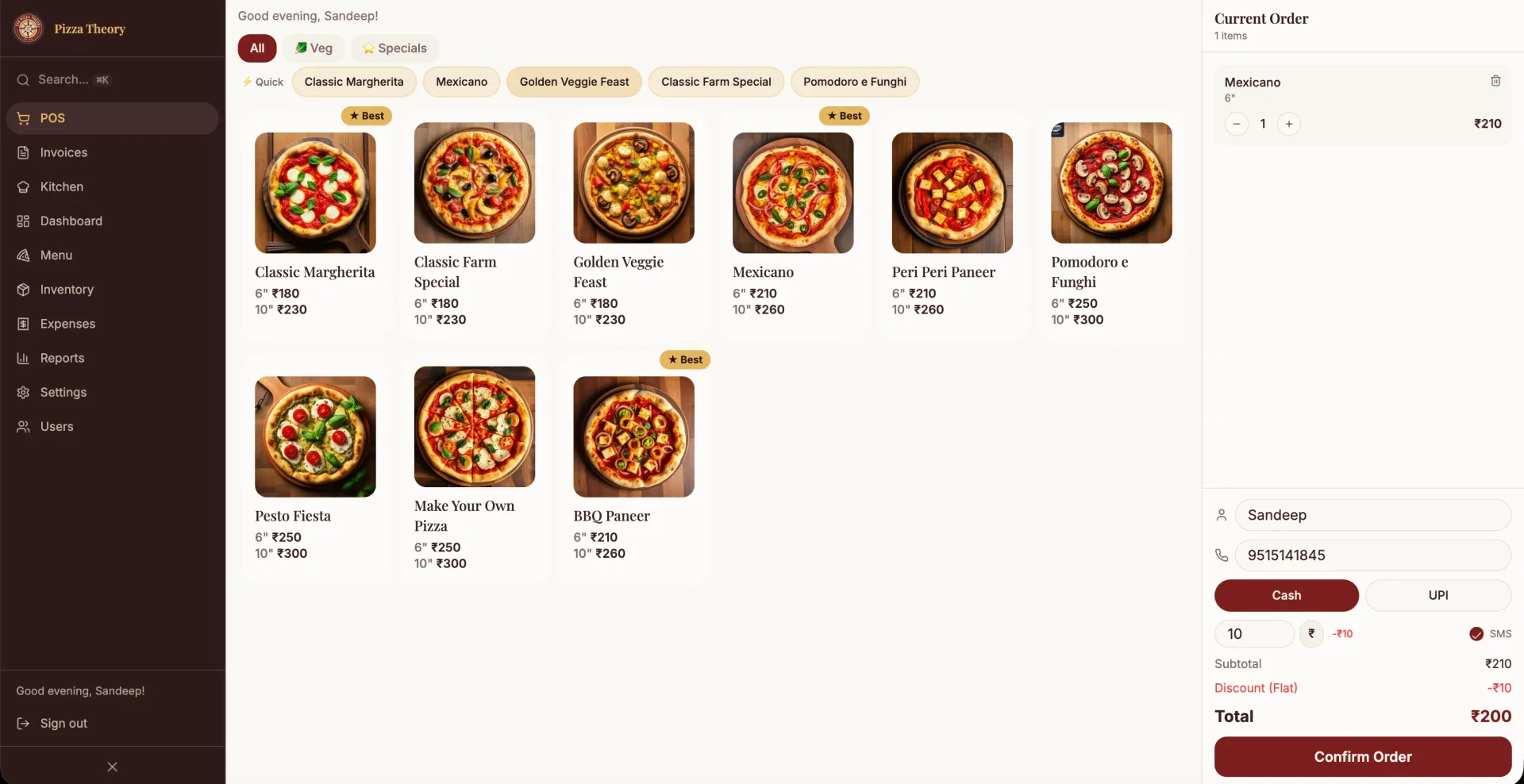
What it does
Every item below exists in the system that is already running. Nothing here is planned, on a roadmap, or coming soon.
Sub-10-second order booking
The one number that decides whether a POS helps or gets bypassed. Every extra second per order compounds across a dinner rush into a queue at the counter.
Payment-gated kitchen queue
Orders reach the kitchen only after payment confirms, so the line never absorbs an unpaid or cancelled order as wasted food.
Live customer notifications
Automatic updates through placed, preparing and ready for pickup. Every status question a customer no longer needs to ask is a staff interruption removed.
Automated invoicing
Invoices generated as part of taking the order rather than as a separate step, which is where manual billing introduces both delay and error.
Inventory and expense tracking
Stock movement and spending captured during service instead of reconstructed after closing, so the numbers are a by-product rather than an evening task.
Reports
Sales, stock and expense reporting from the same data the counter produced, rather than from a second system somebody has to keep in step.
Role-based users and custom menus
Separate access for counter staff, kitchen and owner, with menus you can change yourself rather than raising a request to have changed.
What actually matters in restaurant POS software?
Almost every POS comparison is written by people who have never worked a rush. The feature tables are accurate and beside the point, because the thing that determines whether a system succeeds is how long it takes to book one order with a queue forming behind it. If that is thirty seconds, staff will find a workaround by the end of the first week, and your data will be wrong from then on.
The second thing that matters is where payment sits in the flow. A kitchen that starts cooking before payment confirms is absorbing every cancelled and mistaken order as wasted ingredients. Gating the kitchen queue on payment sounds like a small sequencing decision and is one of the larger margin decisions in the system.
Third is whether the software removes questions or creates them. Customers asking where their order is, staff asking what is in stock, and owners asking what the evening cost are all questions a POS should answer without anybody having to ask. Automatic status notifications exist for exactly that reason, not as a novelty.
What matters much less than vendors suggest: the number of integrations, the appearance of the dashboard, and loyalty features you will not configure. Build the counter flow properly first. Everything else is easier to add later than it is to retrofit speed.
Is this a fit for you?
A good fit if
- Quick-service and takeaway restaurants where counter speed decides the queue
- Kitchens losing food to unpaid or cancelled orders
- Owners reconstructing stock and expenses after closing
- Operators whose staff currently work around the POS rather than through it
Probably not, if
- Large multi-outlet chains needing franchise-level consolidation we have not built
- Restaurants whose existing POS is fast and well-liked: there is no case to switch
- Anyone needing table-service floor management as the primary workflow