The one number that decides everything
Restaurant POS software is the system that takes an order, bills it, tells the kitchen, and records what it cost you. Almost every comparison of it is written by people who have never worked a Friday rush, which is why they are accurate and useless.
Here is the number that actually decides whether a POS succeeds: how long it takes to book one order with a queue forming behind you. If that is thirty seconds, your staff will have invented a workaround by the end of the first week — a paper pad, a note on a phone, a habit of batching orders — and from then on your data is wrong and you do not know it.
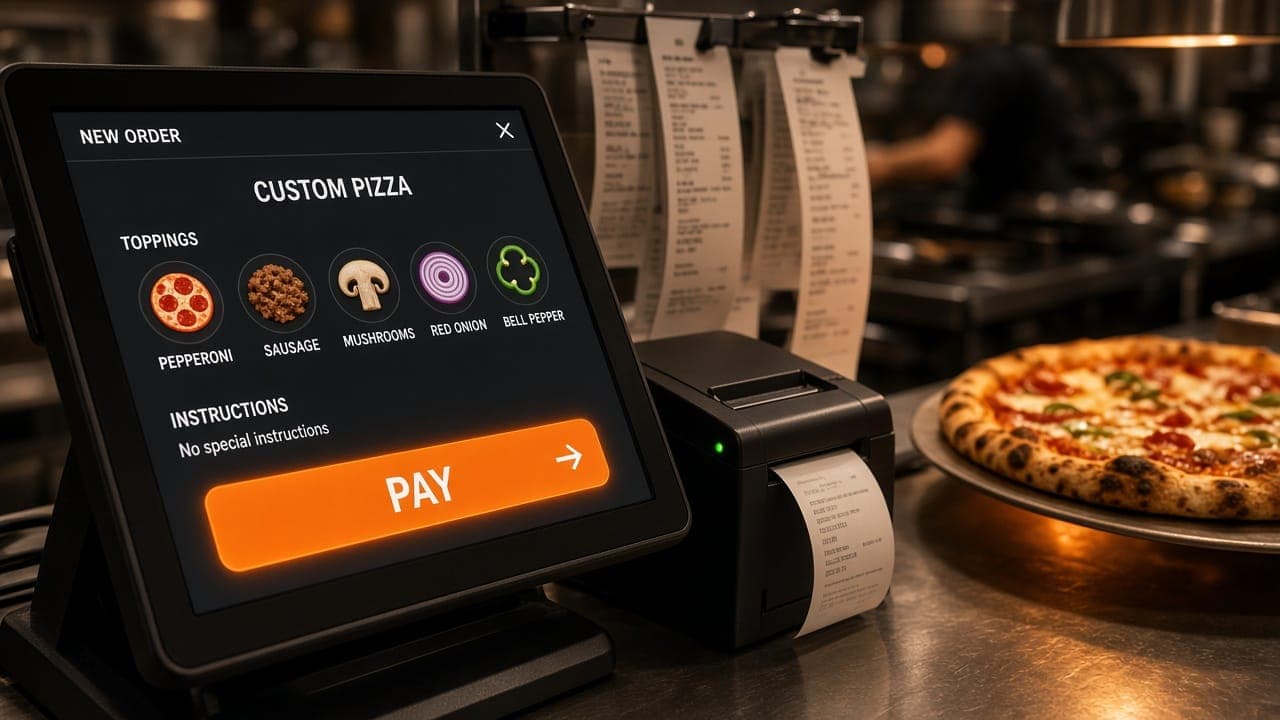
We built a POS end to end for a pizzeria and designed it around this. The target was under ten seconds from starting an order to invoice, and hitting that changed how the counter ran more than any other decision in the project.
Ask for the demo to be done badly on purpose
When a vendor demonstrates a POS, they book a simple order slowly and clearly. That tells you nothing.
Ask instead for this: book an order with three items, one modified, then add a fourth item after the customer changes their mind, then split the payment. Time it. Then ask them to do it again while you talk over them, because that is the actual working condition.
Most products handle the happy path well. The cost lives in modifications, additions after the fact, and corrections — and those are the majority of real orders in any restaurant that does more than one thing.
Where payment sits in the flow
This is the decision that most affects margin and almost never appears in a feature comparison.
In many systems an order reaches the kitchen screen as soon as it is entered. Payment happens afterwards, or at pickup. That means every cancellation, every walk-away, every mistaken order is absorbed by the kitchen as food already being cooked.
On the POS we built the kitchen queue is gated on payment: nothing reaches the line until payment confirms. It sounds like trivial sequencing. In practice it eliminates a whole category of waste, and it also removes the argument at the counter about whether an order was placed.
Ask any vendor where payment sits relative to the kitchen queue, and whether it can be changed. If they have not thought about it, that tells you how much restaurant floor time went into the product.
The questions customers ask that software should answer
Count the interruptions during one service. A large share of them are customers asking where their order is, and every one takes a member of staff away from what they were doing.
Automatic status notifications — placed, preparing, ready for pickup — remove almost all of that. It reads like a nice-to-have on a feature list and behaves like extra staffing during a rush. We built it for exactly that reason and it is one of the parts the client noticed most.
The same logic applies internally. Staff asking what is in stock, and owners asking what the evening cost, are both questions the system already has the data to answer. If it makes you go and look, it is not finished.
Inventory and expenses: during service, not after
Most small restaurants reconstruct their numbers after closing. Someone counts stock, totals the expenses, and works out roughly how the day went. It takes an hour, it happens when everyone is tired, and it is where margin quietly disappears unnoticed for months.
A POS that captures stock movement and expenses as a by-product of taking orders removes that task entirely. You get the numbers because service happened, not because someone stayed late.
Check specifically whether stock decrements automatically from the menu items sold, and whether recipe-level tracking exists if you need it. Plenty of products track stock as a separate manual list, which is a spreadsheet with extra steps.
Features you will probably never use
Being honest about this saves money. In our experience the following get bought and not used by small operators:
Loyalty programs. Configuring one properly takes sustained attention. Most are set up in the first month, never revisited, and quietly stop being mentioned to customers.
Deep third-party integration lists. Impressive on a comparison sheet. What matters is whether it integrates with the two things you actually use, which is a much shorter question.
Table-service floor management, if you are a takeaway or quick-service operation. It is a substantial part of what you are paying for and irrelevant to how you work.
Analytics dashboards with thirty charts. You will look at daily sales, item popularity and stock. Everything else is decoration, and a product that leads with dashboard screenshots is usually weaker at the counter.
None of this means these features are bad. It means you should not let them decide between products, because the counter flow should.
Subscription versus owned
Subscription POS is the right answer for most single-outlet restaurants. It is cheap to start, supported by someone else, and good enough. We would rather tell you that than sell you a build. Our restaurant POS pricing guide sets out what each route costs in India.
The calculation changes in three cases. When your flow is the advantage — a specific kitchen sequence, a particular notification pattern — and no product accommodates it. When you run several outlets and per-outlet licensing starts exceeding the cost of ownership. And when transaction fees on card payments through the vendor's own processor add up to more than the license itself, which is worth calculating because it is often the larger number.
On the last point: read the payment terms carefully. A POS that appears cheap monthly and takes a slice of every card transaction is not cheap, and the total is rarely presented in one place.
For what it is worth, we document how we scope and price custom work, including what pushes the number up, because a figure without a scope is not information.
Rollout is where good systems die
The software being right is about half the job. The other half is the fortnight after you switch.
Plan to run the new system alongside the old one for a few days rather than switching overnight, and pick the quietest shift to start, not a weekend. Staff will be slower at first — that is not a sign the product is wrong, and switching back at the first difficult service is how restaurants end up paying for two systems and using neither.
Train on the awkward cases, not the simple ones. Anyone can learn to book a straightforward order. What causes the workaround habit is not knowing how to void an item, split a bill, apply a discount, or correct an order that has already reached the kitchen. Cover those four in training and most of the resistance disappears.
One more thing worth deciding upfront: who is allowed to void and discount. If everyone can, you have no control over margin. If only the owner can, service stalls whenever they are not there. A role-based system lets you draw that line where it suits your shift patterns, which is one of the genuine advantages of having permissions at all.
Delivery aggregators are a separate decision
Most Indian restaurants take a meaningful share of orders through delivery platforms, and those orders arrive in the platform's own tablet rather than your POS. Every vendor will offer to integrate. (Direct ordering is a separate question again; online store or WhatsApp covers the trade-off.)
Be careful what you are buying. Integration usually means orders are pulled into your POS for record-keeping, which is genuinely useful for stock and reporting. It does not mean you escape the commission, and it rarely means you control the customer relationship.
The honest framing is that aggregator integration is a bookkeeping convenience rather than a growth feature. Worth having, not worth choosing a product for — and if it is presented as the headline reason to buy, that tells you something about the rest of the system.
A practical evaluation sequence
If you are choosing now, do this in order:
- Time one complicated order on each product, yourself, at the counter
- Ask where payment sits relative to the kitchen queue
- Ask what happens when the internet drops, and make them show you
- Check whether stock decrements automatically from items sold
- Ask for the three-year total including hardware and transaction fees
- Ask whether you can change the menu without raising a request
- Ask how you export your sales history if you leave
Point six matters more than it sounds. A restaurant that has to ask permission to change a price will eventually stop using the system correctly, and then the reports stop being true.
Where this fits with everything else
A POS runs the counter. It does not bring anyone through the door, and the two are often bought as though they were the same project.
If people cannot find you, that is a different problem — see what we build for restaurants for how the operational system and the site that feeds it fit together. And if you want the system we built rather than a description of it, the restaurant POS page lists exactly what it does, with nothing on it that is not already running.