The key points
- A request is not a ticket until it has a dealer, a serial or model number, an issue, a photo and an urgency, and a ticket ID goes back to the dealer.
- WhatsApp reply buttons, list messages and Flows collect those fields inside the chat, so dealers do not install or learn anything new.
- SLA clocks run per category (machine down, parts dispatch, parts quote, warranty) and pause only when the ball is with the dealer.
- Status updates outside the 24-hour customer service window go out as approved templates that carry the ticket ID.
- The same records give you repeat failures by model, which a chat history never will.
Why do WhatsApp service requests turn into chaos?
A dealer sends a photo of a pump, then a voice note, then "urgent, customer waiting" two hours later. The photo has no serial number, the voice note has no part name, and the three messages sit in different people's phones. Nobody owns the request, nobody can say when it arrived, and the dealer's only way to get status is to message again. That is the chaos: a chat has no owner, no required fields and no clock.
Dealers use WhatsApp because it is fast and already on their phone. A portal login they have to remember loses to it every time, a pattern covered in getting dealers to use a new portal. So the design that holds is to keep the dealer where they are and change what happens on your side of the conversation: every request becomes a record with required fields, an owner and a clock.
What fields must a request carry before it becomes a ticket?
Decide the minimum record first, because the conversation is built to collect it. Anything not on this list is captured later by whoever picks up the ticket. The minimum-fields table further down lists each field, why a service desk needs it, and how the chat collects it.
A spare-part request adds two fields: the part number or description and the quantity. When the dealer does not know the part number, the ticket carries the model and a photo, and the parts desk resolves the number against the parts catalogue for that model. Dealer identity is never typed: it comes from the dealer's registered WhatsApp number, matched against your dealer master.
How does a guided WhatsApp conversation collect them?
Meta's WhatsApp Business Platform has three tools for this. Reply buttons offer up to three predefined answers and send your system the ID of the one tapped. List messages offer up to ten rows across sections, which suits a request type or a fault category. Flows are structured forms with screens and components such as text fields and dropdowns, and an optional endpoint on your server that decides what the next screen shows.
Which to use depends on how many fields you need. For a simple service request, three or four buttons and one list are enough, and each answer arrives as a webhook your workflow can act on. For a spare-parts request with several line items, a Flow keeps the whole form in one screen sequence. A dealer who messages first can be sent a Flow through an interactive message, and the completed form comes back as a message in the same webhook as every other reply, carrying the submitted data as a JSON string. That response message does not name the Flow, so put an identifier in the flow token and match on it.
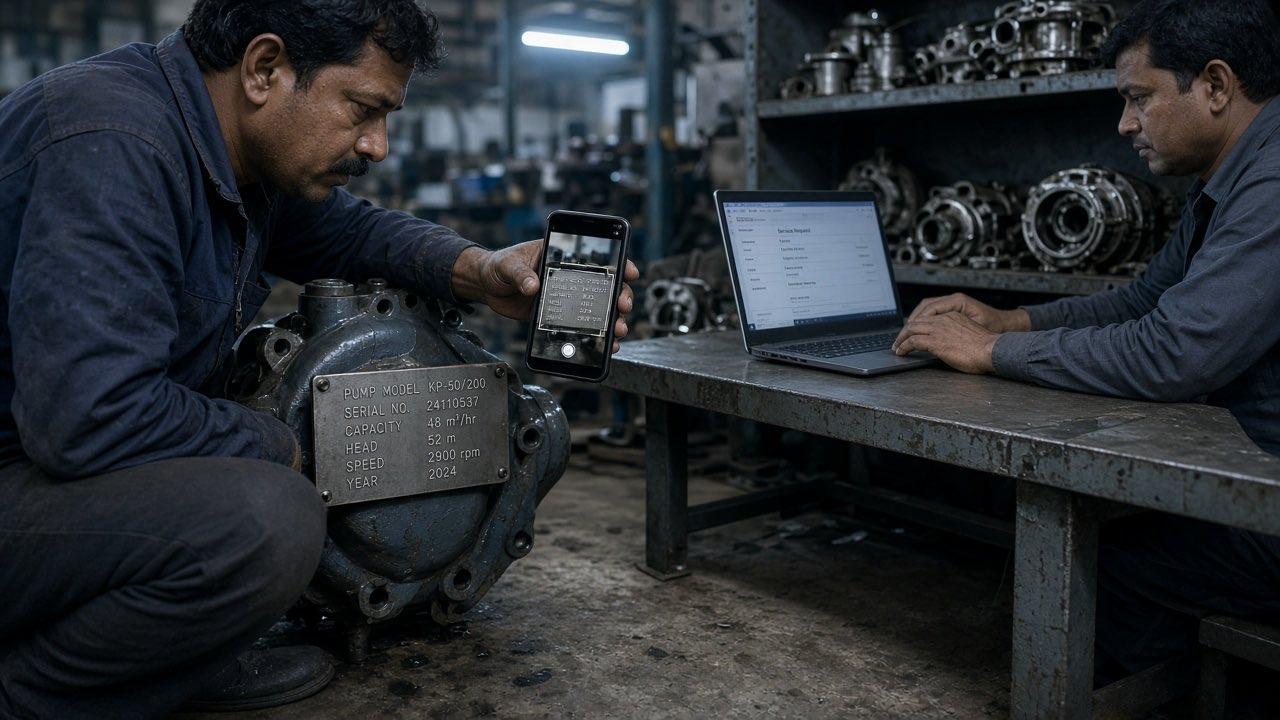
The photo is the one field the chat collects the plain way. An inbound image arrives with a media ID and an optional caption, and your system fetches the file with a GET on that ID and stores it against the ticket. Ask for the nameplate first and the fault second: a photo of the plate gives you the serial number, and the model follows from it.
What happens after the dealer hits send?
The first reply is the ticket ID, sent within seconds, with the request type, the model and the urgency read back so the dealer can see it was understood. From that moment the dealer has a reference to quote and your team has a record to work.
Assignment follows rules, not whoever sees the message first. Route by request type and territory: a machine-down ticket goes to the regional service engineer on duty, a parts quote to the parts desk, a warranty question to the warranty coordinator. The dealer pricing and credit rules apply to the parts side: the quote shows the price for that dealer's tier, and the order is checked against available credit before it is confirmed, the same way a portal order is.
Parts lookup is a query against two sources. The parts catalogue maps a model and serial range to the right part number, including superseded numbers. The stock record in your ERP says whether it ships today, and the connection is the same one described in connecting a website to your ERP. A ticket for an in-stock part can go from request to dispatch note without a person typing a part number.
How do status updates, escalation and closing the loop work?
A dealer's message opens a 24-hour customer service window, and inside it you can send free-form replies. Outside it, only approved template messages can go out. Status changes often happen after the window has closed, so build the status messages as templates: assigned, engineer scheduled, part dispatched, awaiting your reply, resolved. Each is approved before it can be sent, and each carries variables such as the ticket ID and the status. Keep the wording short and factual, and let the dealer's reply reopen the window.
Escalation is a second clock inside the first. When a ticket reaches a set share of its SLA time without an owner action, the owner is nudged; at breach, the service manager is notified with the ticket's age and its last note. A dealer who writes "any update?" on an open ticket is not a new request. The workflow attaches the message to the ticket, answers with the current status, and flags the ticket as chased so the report shows where status was missing.
Closing the loop has two steps. The engineer marks the ticket resolved with the cause and the part used. The dealer then gets a message with two buttons, resolved or not resolved, and the ticket closes only on the dealer's tap or after a stated wait. A not-resolved tap reopens the same ticket instead of creating a new one, which keeps the history intact. Where the fault falls under warranty, the ticket hands over to the claim flow described in running warranty registration and claims on WhatsApp.
What can you report once every request is a ticket?
The report that justifies the whole exercise is repeat failures by model and serial range. Group tickets by model, fault category and part used, and a failing component shows up in weeks rather than being discovered when someone remembers three similar complaints. Pass it to engineering and quality with the ticket photos attached.
The operating reports sit beside it: first-response time and resolution time against the SLA by category, tickets per dealer and per territory, the spare parts most often requested per model (which tells you what to stock at regional depots), chased tickets, and reopened tickets. Delivery follows the same pattern as order dispatch: a part leaving the warehouse can send proof and tracking updates, covered in capturing proof of delivery on WhatsApp.
How does Softivum build this?
We connect your WhatsApp Business number to a ticket store, whether that is your existing helpdesk, your ERP's service module or a purpose-built one, with workflow automation between them and custom connectors to your dealer master, parts catalogue and stock. The conversation design, the required fields, the SLA rules per category and the template wording are written down with your service head before any build starts, and the first release covers one request type for a pilot group of dealers.
Reliability of the inbound path matters: a missed webhook is a missed ticket, so retries and logging come with the build, and why WhatsApp webhooks fail lists what to check.
Where AI reads the first part of a conversation, what AI can help a manufacturer with draws the line on technical and safety questions: those always go to a person. Order intake runs on the same WhatsApp foundation, set out in turning retailers' WhatsApp orders into Tally sales orders.
Minimum fields on a dealer service or spare-parts ticket
| Field | Why the service desk needs it | How the chat collects it |
|---|---|---|
| Dealer | Decides territory, tier, credit and who sees the ticket | Matched from the registered WhatsApp number against the dealer master, never typed |
| Request type | Chooses the owner and the SLA clock | List message: service visit, spare part, warranty, other |
| Serial or model number | Identifies the exact build, warranty status and the right parts | Photo of the nameplate first, then a typed confirmation or a lookup by serial |
| Issue | Lets the engineer prepare tools and parts before the visit | Fault category from a list, plus one free-text line |
| Photo or video | Shows what the dealer cannot describe | Image message stored against the ticket |
| Urgency | Sets the priority and the escalation path | Three buttons: machine down, working with a fault, planned |
| Part number and quantity (spares) | Drives the quote, stock check and dispatch | Typed, or resolved by the parts desk from model plus photo |
The request conversation, step by step
Greet and identify the dealer
The dealer's number is matched to the dealer master. A known dealer sees a short greeting with their name and three choices. An unknown number is routed to onboarding, not to the service queue.
Choose the request type
A list message offers service visit, spare part, warranty and other. The tap is returned to the workflow with a row ID, so no one has to read free text to route it.
Identify the machine
Ask for a photo of the nameplate. Read the serial, look up the model and warranty start, and ask the dealer to confirm with a button. If the plate is unreadable, offer a typed entry.
Capture the issue and urgency
A list of fault categories for that model, one free-text line, then the urgency buttons. A photo or short video is requested last.
Confirm and return the ticket ID
Read back the summary, create the ticket, and send the ticket ID with the owner's name and the next expected step.
Hand over to the owner
The ticket lands in the owner's queue with the SLA clock running. Dealer replies on the same chat attach to the ticket.
Dealer request ticketing checklist
- Is the minimum field list agreed with service, parts and warranty owners before the conversation is designed?
- Is the dealer identified from the registered number rather than typed?
- Does every request return a ticket ID to the dealer in the same chat?
- Does each request type have an owner rule by territory and an SLA clock with defined start, pause and stop events?
- Are status messages approved as templates so they can be sent after the 24-hour window closes?
- Is a repeat message from the dealer on an open ticket attached to it instead of creating a duplicate?
- Does the ticket close only on the dealer's confirmation or a stated wait, and does a not-resolved reply reopen it?
- Do reports show repeat failures by model and serial range, and the parts most requested per model?
Sources
Rules and guidance this answer relies on. Policies change, so check the current version before acting on it.